
IT Solutions for Small Businesses
Discover how integrated IT solutions, cloud hosting, cybersecurity, and custom software drive SMB growth in 2026. Modernize your business technology stack today.
Complete 2026 Guide
Small and medium sized businesses (SMBs) lose an average of 12.4 hours per employee each week to disconnected software, legacy servers, and reactive IT troubleshooting. In 2026, technology is no longer an administrative utility it is the operational infrastructure that dictates growth, cyber resilience, and profit margins.
Adopting an integrated business IT strategy allows growing companies to streamline operations, eliminate data silos, and deploy enterprise grade capabilities without enterprise level overhead.
This master guide serves as an authoritative reference for structuring, modernizing, and scaling modern business technology environments.
What Are IT Solutions?
Real World Business Examples
-
Retail & E commerce: Connecting a cloud based point of sale (POS) system with custom warehouse inventory management, automated supplier reordering, and unified customer loyalty platforms.
-
Professional & Financial Services: Integrating custom Customer Relationship Management (CRM) platforms with encrypted document management, automated invoicing, and zero trust remote access.
-
Logistics & Distribution: Linking GPS fleet tracking, warehouse management systems (WMS), and automated SMS dispatching over a redundant, enterprise networking setup.
Why SMBs Need Integrated IT Solutions
Traditional vs Integrated IT Architecture
Traditional IT Stack (High Friction)
[ Isolated SaaS ] │ ▼ [ Local Backups ] │ ▼ [ Unmanaged Network ] │ ▼ [ Manual Processes ] │ ▼ High Operational Bottlenecks
Integrated IT Ecosystem (Alnafy Architecture)
[ Enterprise Network & VPS ] │ ▼ [ Unified Cloud & AI ] │ ▼ [ Custom Applications & ERP ] │ ▼ [ Zero-Trust Security ] │ ▼ Automated, Secure & Scalable Operations
Business Impact of IT Modernization
| Operational Priority | Fragmented IT Environment | Integrated IT Solutions |
|---|---|---|
| Operational Speed | Manual data entry across disconnected systems | Automated API driven workflows connecting ERP, CRM, and business applications |
| Cybersecurity | Outdated software, weak security controls, and limited monitoring | Zero Trust security, automated patching, MFA, and continuous threat monitoring |
| Scalability | Hardware upgrades required as business grows | Elastic cloud infrastructure that scales on demand |
| Workplace Flexibility | Insecure file sharing and remote access | Secure cloud collaboration, SSO, VPN, and centralized identity management |
| Cost Management | Unpredictable maintenance costs and software sprawl | Predictable operational expenses with optimized licensing and cloud resources |
IT Transformation
Fragmented IT │ ▼ Manual Operations │ ▼ Security Risks │ ▼ High Operating Costs
    │
    ▼
Integrated IT │ ▼ Automated Workflows │ ▼ Zero Trust Security │ ▼ Scalable & Cost Efficient Operations
The Proprietary Frameworks
To help business leaders evaluate their operational posture and technology readiness, Alnafy engineers utilize three proprietary operational frameworks.
1. The Alnafy IT Maturity Framework™
Most businesses progress through five distinct technology stages. Moving up this maturity curve directly correlates with reduced operational risk and higher revenue per employee.
IT Infrastructure Maturity Model
Stage 1: Disconnected (Unmanaged Tools) │ ▼ Stage 2: Managed (Basic MSP Support) │ ▼ Stage 3: Integrated (Cloud & Unified APIs) │ ▼ Stage 4: Automated (AI Workflows & Automation) │ ▼ Stage 5: Predictive (Proactive Enterprise Operations)
-
Stage 1 (Disconnected): Ad hoc hardware, consumer email accounts, unmanaged Wi Fi routers, no formal backups.
-
Stage 2 (Managed): Basic antivirus, outsourced helpdesk support, centralized cloud email (Microsoft 365 or Google Workspace).
-
Stage 3 (Integrated): Custom software development connecting core APIs, cloud migration complete, centralized identity access management (IAM).
-
Stage 4 (Automated): AI driven customer support ticketing, automated database sync, continuous server monitoring.
-
Stage 5 (Predictive Enterprise): Real time business intelligence, automated anomaly detection, AI powered predictive hardware maintenance.
2. The Business Technology Pyramid™
Enterprise Technology Stack
               /\
              /  \
             / AI \
            /------\        Layer 5: Intelligence & Automation
           / Custom \
          /   Apps   \
         /------------\     Layer 4: Business Applications
        / Cloud & VPS  \
       /----------------\    Layer 3: Infrastructure
      / Network & Security \
     /----------------------\ Layer 2: Core Connectivity
    / Managed IT & Backups  \
   /------------------------\ Layer 1: Operational Foundation
Building a technology environment without a solid network and security foundation is like building a skyscraper on sand. Applications and AI capabilities must sit atop secured infrastructure, managed VPS hosting, and reliable networking.
3. The Digital Infrastructure Maturity Index™ (DIMI)
Evaluated on a 0–100 scale across 4 core vectors:
-
Infrastructure Reliability (25 pts): Redundant network connections, VPS hosting uptime, cloud failover.
-
Security Posture (25 pts): Zero trust architecture, endpoint detection and response (EDR), regular audits.
-
Data Integration (25 pts): API connectivity, automated backups, single source of truth databases.
-
Automation & AI Readiness (25 pts): AI workflow bots, automated helpdesk triage, predictive analytics.
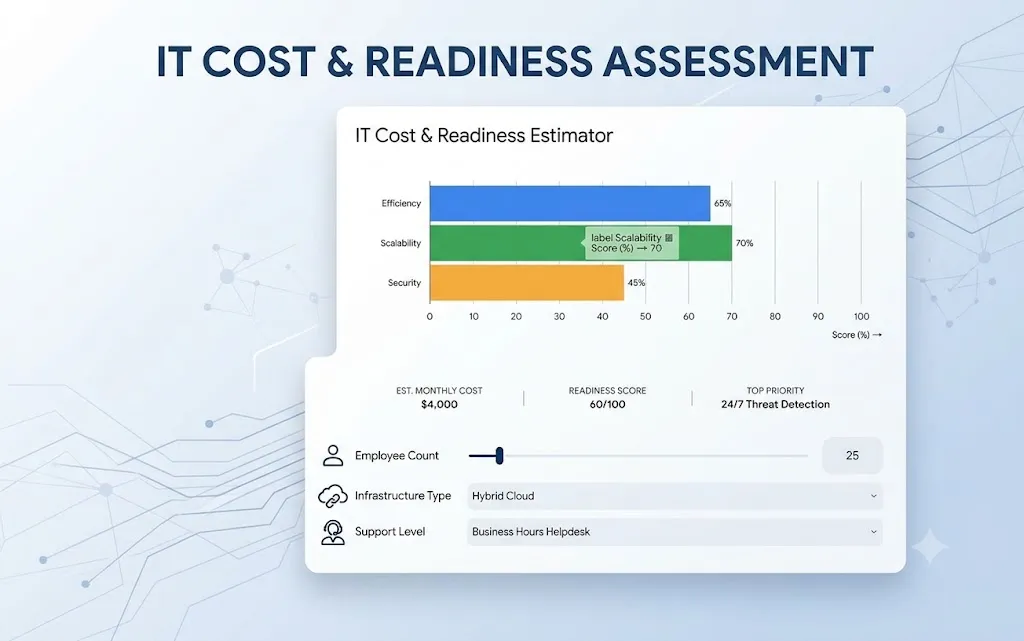
Interactive IT Cost & Readiness Assessment
Use this tool to estimate monthly IT investment needs and assess infrastructure readiness.
Types of IT Solutions for Growing Businesses
To build a resilient technology environment, businesses leverage a combination of core service domains:
Integrated IT Services Portfolio
                    ┌──────────────────────────────┐
                    │     Integrated IT Stack      │
                    └──────────────┬───────────────┘
                                   │
         ┌─────────────────────────┼─────────────────────────┐
         │                         │                         │
         ▼                         ▼                         ▼
┌────────────────────┐   ┌────────────────────┐   ┌────────────────────┐
│ Software & Dev     │   │ Infrastructure     │   │ Managed Services   │
├────────────────────┤   ├────────────────────┤   ├────────────────────┤
│ • Custom Software  │   │ • Enterprise LAN   │   │ • Managed IT       │
│ • Web Applications │   │ • Cloud (AWS/Azure)│   │ • AI Automation    │
│ • Mobile Apps      │   │ • VPS Hosting      │   │ • Cybersecurity    │
│ • Marketing Tech   │   │ • Server Management│   │ • IT Consulting    │
└────────────────────┘   └────────────────────┘   └────────────────────┘
Software Development Solutions
- Learn more: Explore our specialized Software Development Services and custom web platforms.
Enterprise Networking Solutions
- Explore setups: Read our guides on Networking Solutions and custom MikroTik Router Configuration.
Cloud Services & Cloud Migration
- Upgrade today: Check our Cloud Services and review the Azure vs AWS Comparison.
Managed VPS Hosting Solutions
- Hosting options: Learn about VPS Hosting Solutions and compare Shared vs VPS vs Dedicated Hosting.
Cybersecurity Services & Zero Trust
- Secure your assets: Review our full Cybersecurity Services and download the Small Business Firewall Setup Guide.
AI Development & Workflow Automation
- Automate now: Discover our AI Development Services and AI for IT Operations (AIOps).
Web Development & Custom Web Apps
- Build your web presence: See our Web Development Services.
Mobile App Development
- Mobile solutions: Check our Mobile App Development Services.
Server Management & Backup Solutions
- Protect server uptime: See our Server Management Services and review Server Backup Best Practices.
Managed IT Services & IT Support
- Outsource support: Explore our Managed IT Services and local Managed IT Services in Multan.
Business Email & SaaS Workspace Management
- Set up business email: Explore Business Email Hosting and Microsoft 365 Solutions.
Industry Case Studies: Proven Outcomes
-
Case Study 1: Healthcare Regional Clinic Network
-
Background: A multi location medical group suffered from frequent network drops, unencrypted patient record sharing, and slow database queries.
-
Solution: Deployed managed MikroTik hardware firewalls with site to site VPNs, migrated local records to a private HIPAA compliant cloud instance, and implemented strict MFA policies.
-
Measurable Outcome: Achieved 100% network uptime across 4 clinic locations, reduced patient record retrieve times by 58%, and passed compliance audits with zero security flags.
Case Study 2: Manufacturing & Logistics Enterprise
-
Background: An industrial manufacturer relied on paper job cards and manual inventory re entry, leading to shipping delays and lost stock.
-
Solution: Alnafy engineered a custom cloud based ERP web application linked with rugged handheld mobile scanning devices over an enterprise Wi Fi 6 warehouse network.
-
Measurable Outcome: Accelerated order fulfillment by 42%, eliminated inventory discrepancies, and saved 35 weekly hours of manual data entry.
Technology Comparisons: Key Decision Matrices
Making informed technology choices requires clear, side by side evaluations of competing solutions.
Shared Hosting vs VPS vs Public Cloud
| Feature | Shared Hosting | Virtual Private Server (VPS) | Public Cloud (AWS / Azure) |
|---|---|---|---|
| Performance | Shared resources with variable performance | Dedicated virtual resources | Elastic, highly scalable compute |
| Control | Limited hosting dashboard | Full root/administrator access | Complete infrastructure management through APIs |
| Security | Lower security due to shared environment | Isolated virtual machine with stronger security | Enterprise grade IAM, encryption, and compliance features |
| Best For | Personal websites and small blogs | Business websites, custom applications, and SMB ERPs | Enterprise applications, SaaS platforms, and high traffic workloads |
Hosting Comparison
Shared Hosting │ ▼ Low Cost • Basic Control
      │
      ▼
VPS Hosting │ ▼ Dedicated Resources • Full Root Access
      │
      ▼
Public Cloud (AWS / Azure) │ ▼ Elastic Scaling • Enterprise Security • High Availability
Custom Software vs. Off the Shelf SaaS
| Metric | Off the Shelf SaaS | Custom Software Development |
|---|---|---|
| Upfront Cost | Low subscription cost with minimal setup | Higher initial investment for design and development |
| Long-Term Cost | Ongoing per user or monthly licensing fees | No recurring per user licensing fees (maintenance may still apply) |
| Workflow Alignment | Businesses adapt to the software's limitations | Software is built around existing business processes |
| Competitive Advantage | Same platform used by many competitors | Proprietary solution tailored to your organization |
Solution Comparison
Off the Shelf SaaS │ ├─ Lower upfront cost ├─ Faster deployment ├─ Limited customization └─ Recurring subscription fees
VS
Custom Software │ ├─ Higher initial investment ├─ Built for your workflows ├─ Full ownership & flexibility └─ Greater long-term business value
Microsoft 365 vs. Google Workspace
| Category | Microsoft 365 | Google Workspace |
|---|---|---|
| Primary Strength | Enterprise desktop applications (Word, Excel, PowerPoint, Teams) | Cloud first collaboration (Docs, Sheets, Slides, Drive) |
| Security Controls | Microsoft Entra ID (Azure AD), Conditional Access, advanced security policies | Google Identity & Access Management (IAM), 2-Step Verification, security controls |
| Storage | 1 TB OneDrive storage per user (standard business plans) | Shared pooled cloud storage based on subscription plan |
| Ideal Environment | Traditional enterprises, finance, government, and large organizations | Startups, remote teams, creative agencies, and collaborative workplaces |
Platform Comparison
Microsoft 365 │ ├─ Desktop Productivity ├─ Excel & Office Suite ├─ Teams Collaboration └─ Enterprise IT & Compliance
VS
Google Workspace │ ├─ Browser Based Productivity ├─ Real Time Collaboration ├─ Google Drive Ecosystem └─ Fast & Flexible Cloud Workflows
Cost Breakdown: Investment Expectations for SMBs
Technology costs vary based on user headcount, data complexity, and performance requirements.
IT Infrastructure Investment by Business Stage
| Business Stage | User Count | Core Infrastructure Requirements | Estimated Monthly Investment (USD) |
|---|---|---|---|
| Startup / Micro SMB | 1–10 Users | Business email, cloud hosting, password manager, endpoint security (EDR) | $150 – $400 / month |
| Growing SME | 10–50 Users | Managed network, custom web application, automated backups, 24/7 IT support | $850 – $2,800 / month |
| Established Enterprise | 50–250+ Users | Private cloud infrastructure, custom ERP, Security Operations (SOC), AI workflow automation | $3,500 – $12,000+ / month |
Business IT Growth Roadmap
Startup / Micro SMB │ ▼ Cloud Email • Web Hosting • EDR Security ($150–$400/month)
      │
      ▼
Growing SME │ ▼ Managed Network • Custom Apps • Backups • Helpdesk ($850–$2,800/month)
      │
      ▼
Established Enterprise │ ▼ Private Cloud • Custom ERP • SOC • AI Automation ($3,500–$12,000+/month)
Implementation Roadmap: 5 Stage Digital Transformation
Modernizing a business technology stack requires a structured approach to prevent operational disruption.
IT Infrastructure Modernization Roadmap
Phase 1: Infrastructure & Security Audit (Week 1) │ ├─ Inventory hardware and software assets ├─ Review cloud services and subscriptions ├─ Map network topology and user access └─ Identify security gaps and operational bottlenecks
    │
    ▼
Phase 2: Technology Strategy & Architecture (Week 2) │ ├─ Design target IT architecture ├─ Select cloud or VPS platform ├─ Define backup and disaster recovery strategy └─ Plan security framework and software integrations
    │
    ▼
Phase 3: Security Hardening & Network Upgrades (Weeks 3–4) │ ├─ Enable Multi-Factor Authentication (MFA) ├─ Deploy enterprise firewalls ├─ Implement password management └─ Configure automated 3-2-1 backup strategy
    │
    ▼
Phase 4: Cloud Migration & System Integration (Weeks 5–6) │ ├─ Migrate data and workloads to cloud or VPS ├─ Integrate ERP, CRM, and business applications ├─ Configure secure APIs └─ Validate performance and security
    │
    ▼
Phase 5: Monitoring & Continuous Optimization (Week 7+) │ ├─ Train users on security best practices ├─ Enable 24/7 infrastructure monitoring ├─ Configure SOC alerts and automated helpdesk └─ Continuously optimize performance, security, and costs
Common IT Mistakes SMBs Make
1. Buying Consumer Hosting for Business Apps: Shared hosting causes high page latency, server crashes, and missing security patches. Always deploy dedicated VPS hosting or enterprise cloud environments.
2. Treating Backups as Optional: Storing a single backup on a local hard drive leaves companies vulnerable to ransomware and drive failures. Always follow the 3-2-1 backup rule.
3. Ignoring Shadow IT: Employees using personal cloud storage accounts for company files creates severe data leakage risks and compliance violations.
4. Neglecting Network Documentation: Unrecorded administrator passwords and undocumented network cabling layouts create operational blind spots during outages.
How AI Is Transforming IT Operations
AI Powered IT Operations
                ┌──────────────────────────────────┐
                │     AI Powered IT Operations     │
                └───────────────┬──────────────────┘
                                │
    ┌───────────────────────────┼───────────────────────────┐
    │                           │                           │
    ▼                           ▼                           ▼
┌─────────────────────┐ ┌─────────────────────┐ ┌─────────────────────┐ │ Automated Support │ │ Threat Prevention │ │ Predictive Analytics│ ├─────────────────────┤ ├─────────────────────┤ ├─────────────────────┤ │ • AI Helpdesk │ │ • Threat Detection │ │ • Disk Monitoring │ │ • AI Workflow Bots │ │ • Auto Patching │ │ • Network Analytics │ │ • Ticket Routing │ │ • Vulnerability Mgmt│ │ • Capacity Planning │ └─────────────────────┘ └─────────────────────┘ └─────────────────────┘
-
AI Helpdesk Triage: Intelligent virtual agents resolve password resets, software access requests, and basic troubleshooting instantly without human delay.
-
Predictive Hardware Maintenance: AI monitoring tools detect disk drive sector errors and memory leaks days before physical failure occurs.
-
Automated Threat Isolation: Machine learning algorithms detect abnormal data access spikes and automatically isolate compromised endpoints in seconds.
Why Choose Alnafy as Your Technology Partner
Building a secure, high performance business requires an end to end technology partner capable of handling every layer of your stack from enterprise networking to custom AI development.
At Alnafy, we do not sell isolated software subscriptions or generic hardware packages. We architect, build, secure, and manage integrated technology ecosystems that power long-term business growth.
-
Full Stack Capabilities: Seamlessly integrating custom software development, cloud migration, enterprise networking, cybersecurity, and managed IT services.
-
Proactive Security Architecture: Built in zero trust security policies, continuous SOC threat monitoring, and automated 3-2-1 backups.
-
Regional & Global Execution: Deep expertise serving global enterprises as well as local regional hubs (including software house and networking services in Multan and across Pakistan).
Frequently Asked Questions (FAQs)
What is the difference between an IT service and an IT solution?
An IT service is an individual technical task—such as setting up an email account, configuring a router, or fixing a printer. An IT solution is an integrated system of software, hardware, cloud infrastructure, and ongoing support designed to solve a broader operational challenge.
What is Managed IT Services (MSP)?
Managed IT services outsource network monitoring, cybersecurity, server management, and technical support to a third party technology provider for a fixed, predictable monthly fee.
How much does IT support cost for a small business?
Outsourced IT support generally ranges from $100 to $300 per user per month, depending on network complexity, backup requirements, and whether 24/7 emergency monitoring is included.
What is the 3-2-1 backup rule?
The 3-2-1 rule dictates keeping 3 total copies of your business data, across 2 different storage media types (e.g., cloud storage and local NAS), with 1 copy stored securely offsite in an encrypted cloud environment.
What is Zero Trust Cybersecurity?
Zero Trust is a security model that operates on the principle of "never trust, always verify." It requires strict identity verification for every user and device attempting to access network resources, regardless of whether they are inside or outside the office network.
Why should a business use a VPS instead of shared hosting?
A Virtual Private Server (VPS) provides guaranteed, isolated CPU, RAM, and storage allocation. Shared hosting forces hundreds of websites to share the same server resources, leading to severe slowdowns and security risks.
What is Cloud Migration?
Cloud migration is the process of moving a company’s digital assets, databases, email systems, and software applications from local physical office servers into secure cloud environments like AWS or Microsoft Azure.
How does custom software development benefit an SMB?
Custom software automates unique internal processes, connects unlinked software tools through APIs, eliminates recurring per user software licensing fees, and gives companies a proprietary technical advantage over competitors.
What is an SLA in Managed IT?
A Service Level Agreement (SLA) is a formal contract defining guaranteed performance metrics, uptime percentages, and helpdesk response times provided by a managed IT partner.
How long does a full cloud migration take?
A basic cloud email and file migration takes 1 to 2 weeks, while complex enterprise migrations involving custom databases and legacy applications typically take 4 to 8 weeks.
Can startups benefit from Managed IT Services?
Yes. Early stage startups use managed IT services to establish enterprise grade cloud security, business email, and scalable infrastructure right from day one without hiring expensive full time internal IT staff.
How often should small businesses update their firewalls and software?
Security patches and firewall updates should be applied monthly, while critical zero day vulnerability patches should be applied within 24–48 hours of release using automated patch management.
What is the difference between AWS and Microsoft Azure?
AWS offers a broader selection of infrastructure cloud services, while Microsoft Azure integrates seamlessly with existing enterprise Microsoft 365, Active Directory, and Windows Server ecosystems.
What hardware is required for a small business network?
A reliable business network requires an enterprise hardware firewall (e.g., Fortinet or MikroTik), a managed Gigabit/10G switch, enterprise Wi Fi access points, and a multi WAN router for backup internet connectivity.
How does AI improve business IT management?
AI monitors system logs for abnormal activity, automates routine helpdesk ticketing, predicts hardware drive failures, and streamlines data extraction across back office workflows.
About the Author
The Alnafy Engineering & IT Strategy Team is a knowledgeable contributor sharing expertise and insights on technology and business topics.
Comments
Leave a Comment
Your comment will be reviewed by our team before appearing.
Loading comments...